

Do Screenshots of QR Codes Work? What You Need to Know
Creating QR Codes: How They Work and How to Make One

You see them on cereal boxes, tucked into the corner of television ads, and standing tall on concert billboards. QR Codes have officially taken over the world. Most people scan these little boxes every single day without ever stopping to think about how they actually come to life.
Understanding the process behind QR Code generation can help you make better decisions that can improve your brand design, scan reliability, and digital security. You do not need a degree in software engineering to grasp these concepts. This guide breaks down the technical flow into simple, approachable steps, from the initial data encoding to the final creative customization.
We will also explain the difference between Static QR Codes and Dynamic QR Codes before exploring how Dynamic QR Codes represent the future of flexible marketing.
Note: The brands and examples discussed below were found during our online research for this article.
Key takeaways
- QR Codes are generated using structured encoding algorithms that convert your content into binary data, apply error correction, and arrange it inside a standardized square matrix.
- Every QR Code contains functional elements, such as position markers, alignment patterns, timing patterns, and error correction blocks, that ensure reliable scanning even when partially damaged.
- Static QR Codes store information directly in the pattern, while Dynamic QR Codes store a redirect link, allowing edits, tracking, and long-term flexibility.
- Professional QR Code generators maintain scan reliability during customization by calculating contrast, error correction levels, and safe logo placement.
What is a QR Code?
A quick response code (QR Code) is a two-dimensional matrix barcode that holds significantly more data than a traditional one-dimensional horizontal barcode. While a standard 1D barcode only stores data in one direction, a QR Code stores information both horizontally and vertically.
The Japanese company Denso Wave (a subsidiary of Denso) originally developed this technology in 1994 to track automotive parts during the manufacturing process. Today, these 2D barcode images serve as a bridge between physical objects and the digital world. A modern mobile device or camera app can instantly recognize these patterns and use them to trigger specific actions.
Common data types you can encode into a unique QR Code include:
- Web page URLs for marketing campaigns.
- Contact information via vCard (perfect for business cards).
- Wi-fi credentials for contactless network access.
- Phone number details or SMS triggers.
- Social media profile links.
- App download links for iOS and Android users.
- Event tickets and authentication data.
- Payment data for digital commerce.
When you create QR Codes for your project, you must select one of two primary formats: Static QR Codes or Dynamic QR Codes. While they may look similar at first glance, they offer very different levels of functionality and control.
Static vs Dynamic QR Codes
Before you use a QR Code generator, you must choose between two primary formats.
Static QR Codes
Static QR Codes embed your data directly into the pattern of white squares and black modules. Because the information is “baked in,” you cannot edit the destination data after you create the code. These codes never expire, but they also offer no scan analytics. This type of QR Code works best for permanent information, like a home Wi-Fi password or a specific text string relaying an unchanging personal message.
Dynamic QR Codes
Dynamic QR Codes offer much more functionality for business use. Instead of storing your full URL or other unchanging data, a Dynamic QR Code encodes a short url that redirects the user to your specified landing page. This setup allows you to edit the destination link at any time without reprinting your materials. These codes also enable powerful tracking, allowing you to see exactly how many people scan your QR Codes, when, where, and with what types of devices.
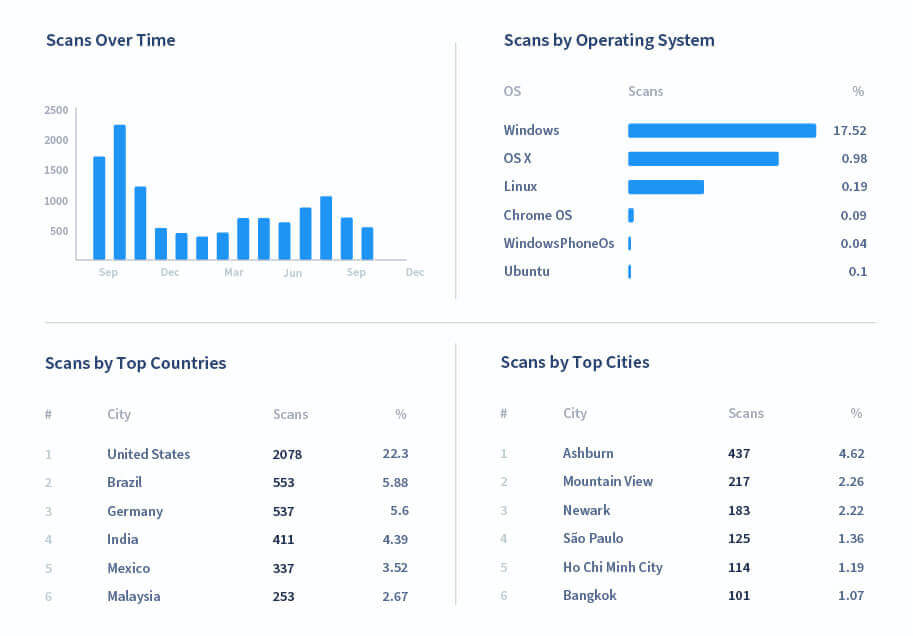
For Dynamic QR Codes, the answer to the question “Do QR Codes expire?” is a little more complicated. Because these codes rely on an integrated redirection short link, they can expire if the underlying redirect service disappears or limits the number of scans you can process in a given timeframe. Essentially, expiration depends on platform and setup, not on QR technology itself. A Dynamic QR Code will always point to its set redirection link, but where the link directs the user from there is generally up to you.
How are QR Codes generated?
The generation process follows strict ISO standards and complex algorithm logic. While your QR Code generator handles the math, the process follows these five essential steps:
Step 1: Data analysis
The generator first analyzes your input to find the most efficient encoding mode. It chooses between alphanumeric, numeric, byte, and kanji modes. This selection determines the density and size of the final QR Code image. As the relative complexity of the underlying data type increases, so does the number of black and white pixels required to fully encode the specified information.
Step 2: Binary conversion
The system converts your text or URL into a string of binary data (1s and 0s). This binary string represents the raw “map” of your code.
Step 3: Error correction (Reed-Solomon)
This is a critical stage for reliability. The generator adds redundant data using the Reed-Solomon algorithm. This error correction allows the code to remain scannable even if it gets dirty or damaged. The default level (L) allows accurate scanning even when seven percent of the code is missing or obscured. Higher levels of error correction (M, Q, H) allow for greater levels of damage tolerance. Error correction enables brand-building customization of your QR Codes, letting you safely place a logo in the center of the code and print it in colors other than black and white.
Step 4: Module placement
The generator places the binary bits into the matrix grid in a specific zig-zag pattern. It carefully reserves specific areas for functional patterns that help QR Code readers understand the orientation of the image.
Step 5: Masking
Finally, the system applies a mask pattern to the grid. This breaks up large blocks of identical colors that might confuse a barcode scanner or camera. Masking ensures each mobile device can read the pattern quickly and accurately.
If you’re interested in learning more about how the whole process works, you can even create QR Codes yourself in Python.
The core components inside every QR Code
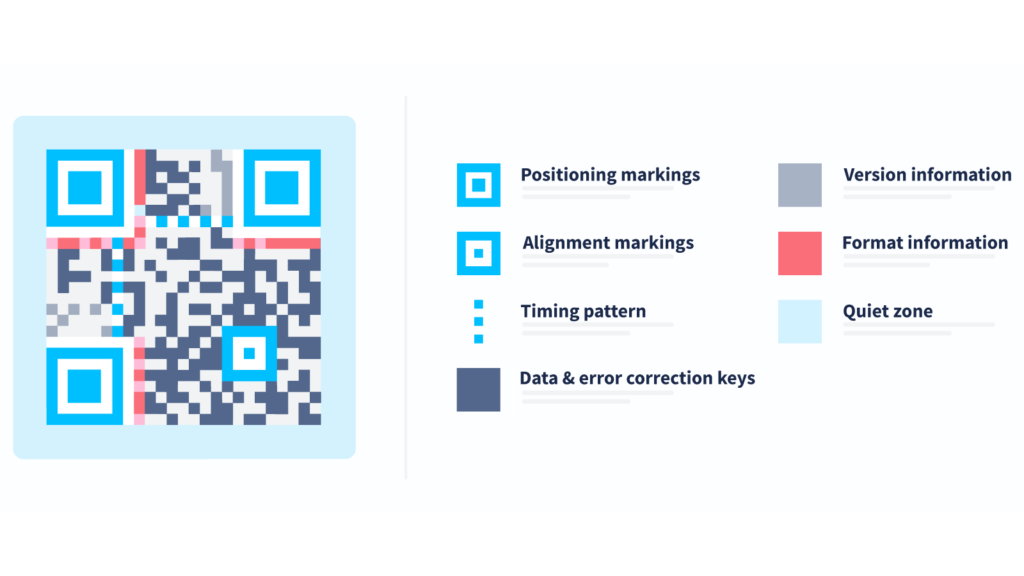
Every QR Code image consists of specific zones that tell the scanner how to read the information.
- Positioning markings: You will spot three large squares in the corners. These elements, also known as “eyes,” tell the scanning app where the code starts and ends, allowing for 360-degree scanning.
- Alignment markings: Smaller squares located within the grid help the scanner correct for distortion if the code is on a curved surface or viewed at an angle.
- Timing pattern: These lines of alternating dark and light modules connect the position patterns. They define the size of the data matrix.
- Data and error correction keys: This area stores redundant data. It allows the code to remain scannable even if up to 30% of it sustains damage.
- Version information: This area indicates the size (number of modules) of each QR Code. A larger version contains more data, and the size of the code increases.
- Format information: This data defines the QR Code’s specifics, such as error correction level and mask pattern.
- Quiet zone: This is the white margin of empty space around the code. It helps the scanner distinguish the code from the surrounding design.
The code stores its contents in a series of modules, the black and white squares that make up the data grid. The scanner reads these as binary bits (1s and 0s).
How Dynamic QR Codes are generated differently
Unlike their static counterparts, Dynamic QR Codes do not store your final content directly within their pattern. Instead, the QR Code generator embeds a short URL that acts as a digital bridge. When a user opens their camera app to scan the code, the short URL instantly redirects them to your intended web page.
This redirection logic provides several transformative benefits for your marketing campaigns:
- Editable destination: You can swap your destination link at any time without changing the physical QR Code image.
- Campaign flexibility: You can easily update your strategy to reflect seasonal promotions or new product launches.
- Scan analytics: You gain the ability to track every interaction, including the time of the scan and the type of mobile device used.
- A/B testing capability: You can experiment with different versions of a landing page to see which one drives more conversions.
- No reprinting required: Because the destination lives in the cloud rather than the code pattern, you save money by avoiding costly reprints of business cards or product packaging.
When you need to pivot your strategy, you can easily adjust your QR Code landing pages to keep your content fresh and relevant. For those who need to create and oversee QR Codes in large quantities, a batch QR Code generator allows you to manage numerous codes efficiently within a single workflow.
This sophisticated approach specifically supports low-to-medium volume businesses. It can provide the professional control and performance insights you need without the massive hurdles of enterprise-level complexity.
How QR Codes work when scanned
The scanning process is essentially the generation process in reverse.
- Your mobile device camera detects the three position markers.
- The software interprets the grid of modules.
- Error correction fills in any missing or obscured data points.
- The device decodes the binary data back into its original form.
- An action, like opening a web page or saving contact information, triggers automatically.
It’s important to remember that Dynamic QR Codes first resolve to a short url, then redirect instantly to the specified user destination or action trigger.
Modern use cases for QR Codes in 2026
The landscape of QR technology has shifted from simple web links to vital infrastructure for business operations and consumer engagement. In 2026, companies use these modules to build trust, streamline payments, and automate complex workflows.
Marketing & advertising
Modern marketing campaigns rely on QR Codes to bridge the gap between physical touchpoints and digital conversions.
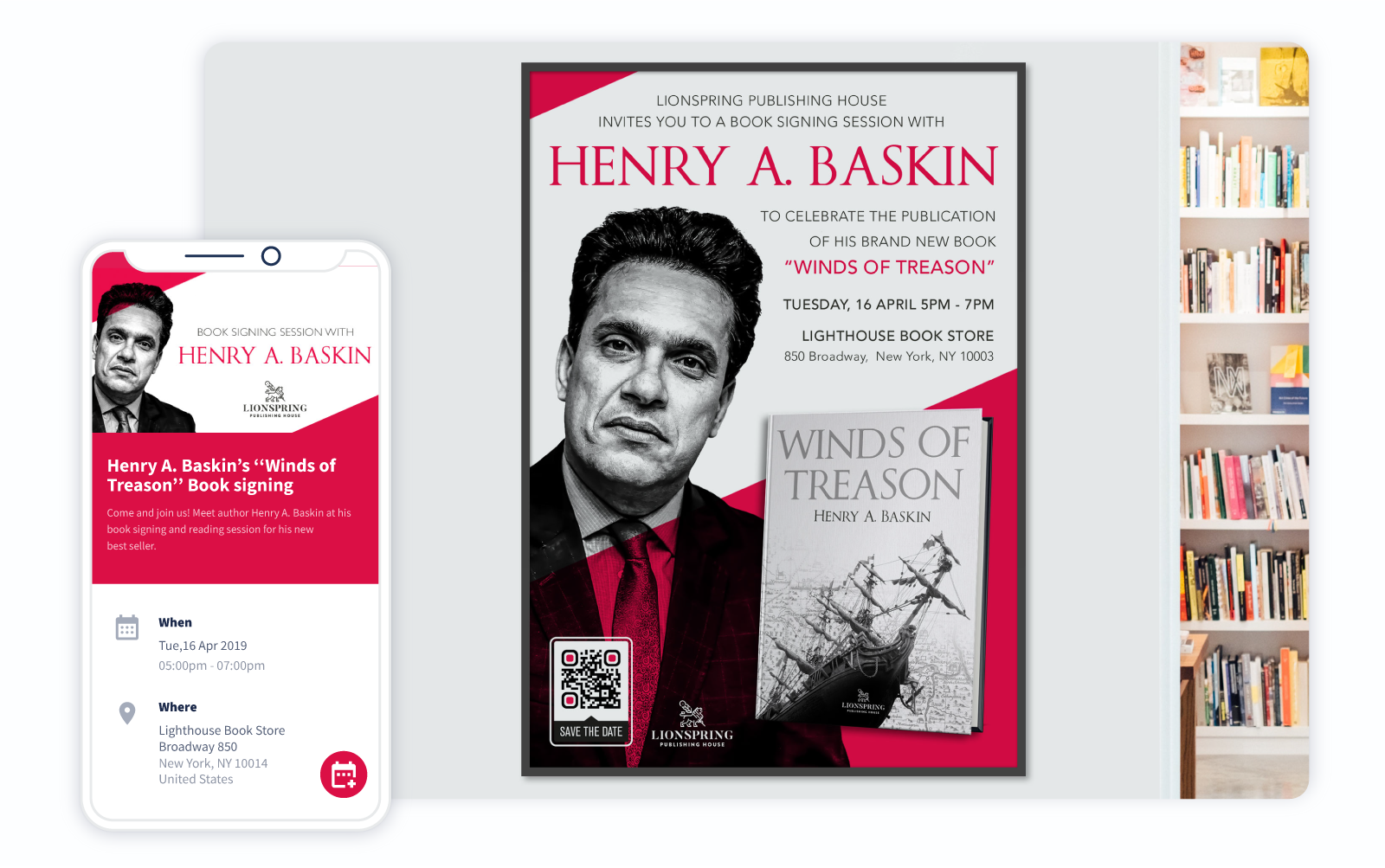
- Offline-to-online campaigns: Marketers place custom QR Codes on billboards or transit ads to lead users directly to immersive landing pages.
- Influencer packaging tie-ins: Brands print unique QR Codes on limited-edition packaging that unlock exclusive video content from social media partners.
- QR-driven loyalty programs: Customers scan QR Codes at checkout to instantly collect points or redeem rewards through their mobile devices without needing a physical card.

Product packaging & compliance
Transparency is a major driver for brand loyalty in 2026.
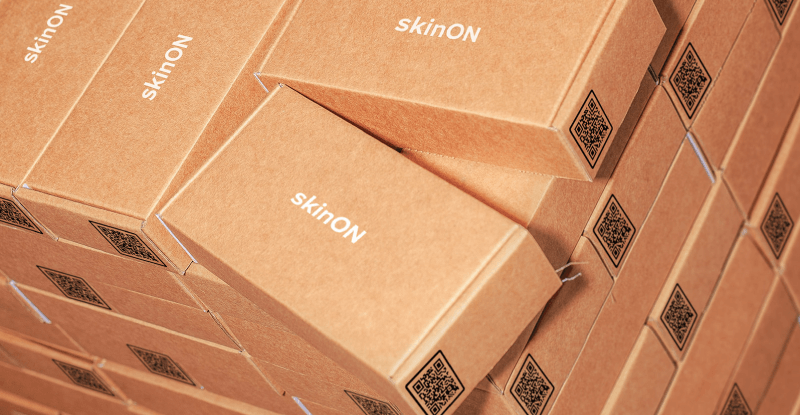
- Sustainability transparency: QR Code images on product labels allow consumers to view the carbon footprint and recycling instructions for that specific item.
- Ingredient sourcing stories: Shoppers can sometimes learn about the farm where a product’s ingredients grew, fostering a deeper connection with the brand.
- Regulatory disclosures: Companies can manage complex legal requirements by hosting digital manuals and safety data through a QR Code on the product packaging.

Events & access management
The events industry uses QR technology to ensure secure and contactless entry.
- Ticketing: Attendees present a quick response code on their Android or iOS device for rapid entry at venues.
- Membership verification: Clubs and gyms use dynamic codes that refresh periodically to prevent unauthorized sharing of access credentials.
- Digital credentials: Professionals share verified certifications or digital conference badges with a single scan.
Payments & digital commerce
QR Codes have revolutionized the way we handle transactions in retail and dining.
- Peer-to-peer payments: Users can transfer funds instantly by scanning a barcode displayed on another person’s screen.
- Restaurant ordering: Diners often scan a code at their table to view a digital menu, place an order, or settle the bill without waiting for a server.
- In-store product information: Retailers place codes on shelves to provide detailed product information, reviews, and inventory availability.
Inventory & logistics
Back-end operations now use the 2d barcode format to outperform the traditional UPC system.
- Asset tracking: Managers use QR Code scans to monitor the location and maintenance history of high-value equipment.
- Warehouse scanning: Staff in many facilities can use their smartphones to manage stock levels and fulfill orders with high precision.
- Internal workflow automation: Scanning a code on a workstation can trigger a specific digital checklist or log the start of a production shift.
Customer onboarding
The post-purchase experience is critical for retention in the SaaS and hardware sectors.
- App downloads: A single scan can detect the user’s operating systems and direct them to the correct store for an app download.
- SaaS onboarding: New users can scan a code in their welcome kit to launch a personalized setup wizard on their computer or tablet.
- Device setup guides: Instead of bulky paper manuals, many manufacturers now provide QR Code links to interactive video tutorials and device setup guides that can evolve over time with product updates.
Best practices before you generate a QR Code
To ensure your customers have a great experience, follow these professional tips:
- Always use Dynamic QR Codes: The ability to edit your link later is a lifesaver for any business.
- Ensure high contrast: Always use dark modules on a light background for maximum scan reliability.
- Maintain the quiet zone: Never crowd the code with other design elements.
- Use vector formats for print: Download your code as an SVG file for large prints like signs to ensure it never looks blurry. Use PNG or JPEG images of your code for digital displays only.
- Use a clear CTA: Tell people what they get for scanning (e.g., “Scan for 10% off”).
- Test on multiple devices: Always scan your code with both iOS and Android devices before going live.
Unlock the full potential of your QR Codes with QR Code Generator
While the underlying process of generating a QR Code relies on sophisticated algorithms and complex data transitions, your personal experience with the technology should remain entirely effortless. Modern software handles the heavy lifting of binary conversion and error correction so you can focus on the creative side of your marketing strategy.
QR Code Generator provides a comprehensive platform where you can easily generate both Dynamic and Static QR Codes depending on your specific project needs. If your campaign goals change after you print your materials, the real-time editing feature allows you to update your destination link instantly without any friction. You also gain access to deep scan analytics that reveal how your audience interacts with your brand across different locations and devices.
Branding customization tools ensure that every code you create aligns perfectly with your visual identity through custom colors and logo integration. You can manage your entire digital library through an organized dashboard that simplifies the oversight of hundreds of different campaigns.
Stop using basic, boring squares. Sign up with QR Code Generator today and create custom QR Codes that build trust and drive action for your brand.
FAQs
How are QR Codes generated?
QR Codes are generated by converting your content into binary data, applying error correction, and arranging that data within a standardized square matrix. QR Code generators automate this process using ISO-compliant algorithms.
What makes a QR Code scannable even if it’s damaged?
QR Codes include built-in error correction blocks using Reed-Solomon algorithms. This allows scanners to reconstruct missing data even if part of the code is scratched, covered, or slightly distorted.
Are Dynamic QR Codes generated differently from Static QR Codes?
Yes. Static QR Codes embed final data directly into the pattern. Dynamic QR Codes embed a short redirect URL, which allows the destination to be edited and tracked after creation.
Can QR Codes expire?
QR Codes themselves do not inherently expire. Expiration depends on how they are configured within the generating platform. Dynamic QR Codes offer greater flexibility for managing long-term campaigns.


QR Code Generator
Your all-in-one QR Code marketing platform
Now you can fully customize your QR Codes with your brand colors and company logo, get scan statistics, and even edit the content after print.
