- Best Practices ●
- COVID-19 ●
- Industry Trends ●
- Partners ●
- Product ●
Creating QR Codes: How They Work and How to Make One

QR Codes continue their rapid rise in 2026 as indispensable tools for connecting the physical and digital worlds. You likely see them everywhere. Restaurants use them for menus. Brands place them on product packaging. Marketers rely on them to drive app downloads. Users love them because they offer instant access to information with a single scan.
You might wonder how these black-and-white squares actually function. How does a simple image store complex data like a website URL or a vCard? Understanding the creation process empowers you to use these tools more effectively. This guide covers QR Code basics, the technical side of how QR Codes work and provides a practical walkthrough on how to create QR Codes using QR Code Generator PRO.
Note: The brands and examples discussed below were found during our online research for this article.
-
Table of contents
- What is a QR Code?
- How are QR Codes Created
- The core components of QR Codes
What is a QR Code?
A Quick Response Code (QR Code) is a type of two-dimensional matrix barcode that stores information in a grid of black and white squares. A Japanese company called DENSO developed the technology in 1994 to track vehicle parts during manufacturing. Masahiro Hara, the engineer behind the invention, designed it to scan quickly and hold more data than traditional barcodes.
One-dimensional barcodes store data horizontally using lines of varying widths. This limits their capacity to a small string of alphanumeric characters. QR Codes store data both horizontally and vertically. This 2D structure allows them to encode significantly more information, including Kanji characters, binary data, and control codes. The unique QR Code design features position markers that allow a QR Code scanner or camera app to read the code from any angle. Barcodes typically require a specific orientation and a dedicated barcode scanner.
QR Codes come in two main varieties: Static and dynamic. Static QR Codes encode the data directly into the pattern. The pattern becomes denser as you add more data. You cannot change the scan destination once you create the code. These codes work well for permanent information, like a Wi-Fi password or a simple text message.
Dynamic QR Codes link to a short URL in the pattern, and that URL redirects the user to their final destination. This setup keeps the QR Code design simple and scannable. You can update the landing page or linked content at any time without reprinting the code. Marketers prefer this type of QR Code for marketing campaigns because it allows for real-time updates and scan tracking.
Here is a quick comparison:
| Feature | Static QR Code | Dynamic QR Code |
| Data Storage | Fixed in the pattern | Stores a redirect URL |
| Editability | Cannot edit after creation | Edit destination anytime |
| Tracking | No analytics | Tracks scans, location, and devices |
| Pattern Density | Increases with data | Remains simple and scannable |
| Ideal Use | One-time personal use | Business, marketing, dynamic content |
How are QR Codes Created
The QR Code creation process involves precise algorithms and structural rules. A QR Code generator handles the heavy lifting, but understanding the mechanics reveals why these codes are so reliable.
The core components of QR Codes

Every QR Code image consists of specific zones that tell the scanner how to read the information.
- Positioning markings: You will spot three large squares in the corners. These elements, also known as “eyes,” tell the scanning app where the code starts and ends, allowing for 360-degree scanning.
- Alignment markings: Smaller squares located within the grid help the scanner correct for distortion if the code is on a curved surface or viewed at an angle.
- Timing pattern: These lines of alternating dark and light modules connect the position patterns. They define the size of the data matrix.
- Data and error correction keys: This area stores redundant data. It allows the code to remain scannable even if up to 30% of it sustains damage.
- Version information: This area indicates the size (number of modules) of each QR Code. A larger version contains more data, and the size of the code increases.
- Format information: This data defines the QR Code’s specifics, such as error correction level and mask pattern.
- Quiet zone: This is the white margin of empty space around the code. It helps the scanner distinguish the code from the surrounding design.
The code stores its contents in a series of modules, the black and white squares that make up the data grid. The scanner reads these as binary bits (1s and 0s).
The data encoding process
The generator follows a strict algorithm to convert your input into a scannable image.
- Data Analysis: The system analyzes the text, website URL, or contact information to determine the most efficient encoding mode (numeric, alphanumeric, byte, or Kanji).
- Binary Conversion: The tool converts your data into a string of binary bits (0s and 1s).
- Error Correction Coding: The system adds Reed-Solomon error correction codewords to the data sequence. This step ensures the code works even when damaged.
- Module Placement: The binary sequence fills the grid in a zig-zag pattern starting from the bottom right. The generator leaves space for the function patterns (eyes and alignment markers).
- Masking: The system applies a mask pattern to break up clusters of identical modules. This improves readability for the camera.
How QR Codes are generated
Professional QR Code solutions add a customization layer on top of this technical foundation. Once the core pattern exists, these tools allow you to modify the code’s visual style. You can change the color of the modules, add a logo to the center, adjust the shape of the eyes, or use a custom frame.
Tools like QR Code Generator PRO ensure that these design changes do not break the code. The system calculates the error correction level to guarantee that your logo does not cover too much data. This balance between aesthetics and functionality is why many businesses use professional generators rather than basic free tools.
How to Create a QR Code Yourself: Step-by-Step Guide
You do not need to be a developer to make a QR Code. Modern platforms simplify the process into a few clicks. Follow this guide to generate high-quality codes for your business.
Step 1: Choose your QR Code type
Your first step when determining how to create a QR Code involves deciding what you want the code to do. QR Code Generator PRO offers various data types to match your goals:
- URL: Links to a web page or landing page.
- vCard: Shares contact information and saves it directly to the user’s phone.
- PDF: Displays a document like a menu or brochure.
- App Store: Directs users to download your app on iOS or Android.
- Social Media: Links to your profiles on platforms like Instagram or LinkedIn.
- Wi-Fi: Connects users to a network without typing a password.
We recommend using Dynamic QR Codes for most business use cases. The ability to edit the link later saves you from reprinting materials if your content changes.
It’s also important to ensure that your QR Code platform doesn’t generate codes that expire. When using a free QR Code generator, no expiration is not necessarily a given.
Step 2: Enter your information
Next, you provide the content. If you choose a website URL, simply paste the link. If you chose a vCard, fill in your name, phone number, email, and address.
The platform validates your input to ensure it works. For Dynamic QR Codes, the system generates a short URL that will serve as the bridge to your content. This approach keeps the data payload light and ensures the code remains easy to scan.
Step 3: Customize your QR Code design
Now you can make the code on brand. Design matters because a visually appealing code can attract more scans. The best QR Code generators let you adjust the following:
- Colors: Change the standard black and white to your brand colors. Ensure there is high contrast between the code and the background.
- Logo: Upload your logo to the center of the code. This inclusion builds trust and lets users know the code is yours.
- Frames: Add a frame with a clear call-to-action (CTA) like “Scan Me” or “Get Coupon.”
- Shapes: Modify the corners and pixels to match your style.
Remember to keep accessibility in mind. High contrast ensures that mobile devices can read the code easily in different lighting conditions.
Step 4: Test your QR Code before publishing
Never print a code without testing it. Scan the code using devices with different operating systems (iOS and Android) and different scanning apps. Check it in low light and bright light. Verify that it directs you to the correct landing page.
Testing prevents costly mistakes. A broken code on 10,000 printed flyers wastes money and frustrates potential customers. Remember, you can fix incorrect links connected to Dynamic QR Codes later, but only if the underlying code is properly scannable when printed.
Step 5: Download and deploy your QR Code
Download your finished code in the right format. PNG or JPG works well for digital use on screens. Use vector formats like SVG or EPS for print materials like billboards or product packaging. Vector formats allow you to resize the image without losing quality.
Place the code where it is easy to see and scan. Avoid placing it in folds or corners where it might distort.
How QR Codes work when scanned
The process flips when a user scans the code. The smartphone camera captures the image, and the QR Code reader software locates the three corner position patterns known as the eyes.
The software analyzes the grid of modules and converts the visual pattern back into binary data. It then applies the error correction algorithms to fill in any missing information. Finally, the device interprets the data and performs the action, such as opening a browser to a website URL or prompting to save a vCard.
This all happens in milliseconds. For Dynamic QR Codes, the device loads the short URL first, which immediately redirects to the target content. This seamless routing allows marketers to control each code’s destination in real time.
Top uses for QR Codes
Businesses across every industry use QR Code solutions to engage customers and streamline operations.
Marketing & advertising
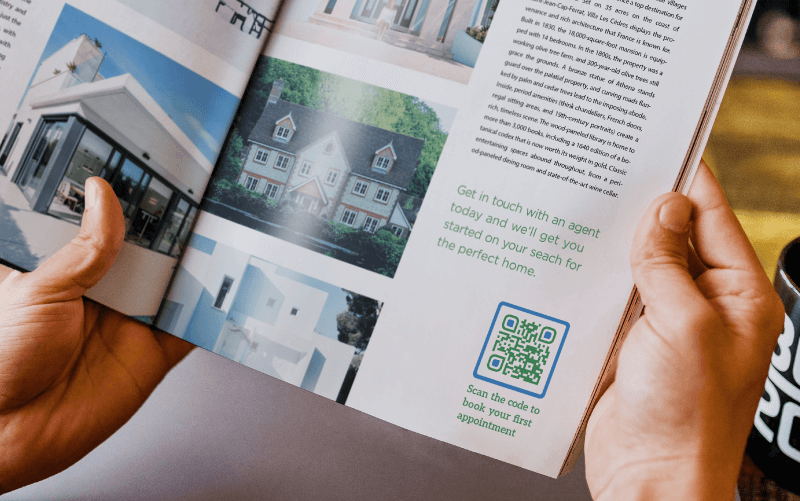
Marketers place codes on billboards, flyers, and magazine ads. This setup bridges the gap between offline media and online conversion. A user scans the ad to visit a landing page, watch a video, or sign up for a newsletter.
Product packaging & compliance
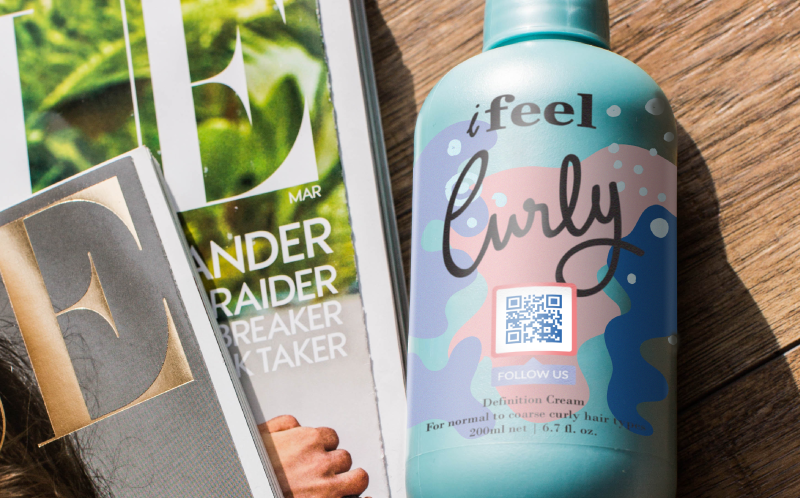
Brands use codes on product packaging to share nutritional info, user manuals, or sustainability stories. This approach saves space on the label while providing unlimited depth of information. It also helps with authentication to prove product conformity with producer standards.
Events and ticketing
Event organizers use codes for contactless ticketing and check-ins. Attendees present their digital ticket, and staff scan it to grant entry. You can also use codes to share event maps or schedules.

Payments and digital menus
The pandemic accelerated the adoption of contactless payments and menus. Restaurants place codes on tables for customers to view the menu, order on their mobile devices, and settle up using payment apps.
Inventory management and logistics
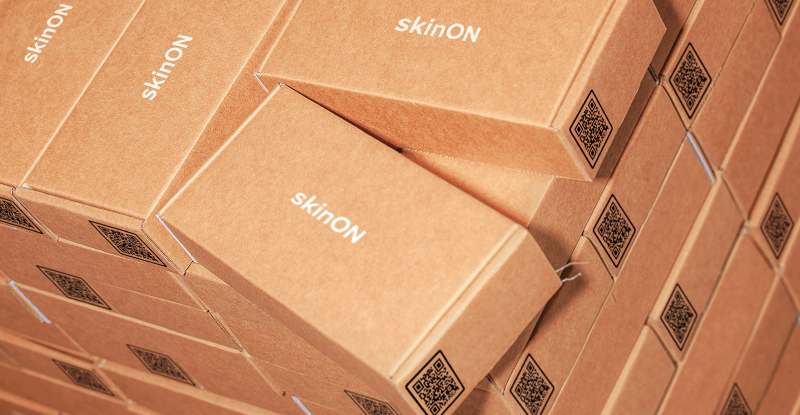
Warehouses use codes to track assets. Staff scan items to update stock levels or view shipping details. QR Codes hold more data than barcodes, making them superior for complex logistics.
Customer onboarding and app downloads
Software companies use codes to drive app downloads. A scan directs the user to the correct app store based on their device, removing friction from the installation process.
Editing and tracking Dynamic QR Codes
The true power of Dynamic QR Codes lies in their flexibility and intelligence.
You can change each code’s content at any time. You might start a campaign linking to a “Coming Soon” page and then switch it to a “Buy Now” page on launch day, while keeping the same physical code on your materials.
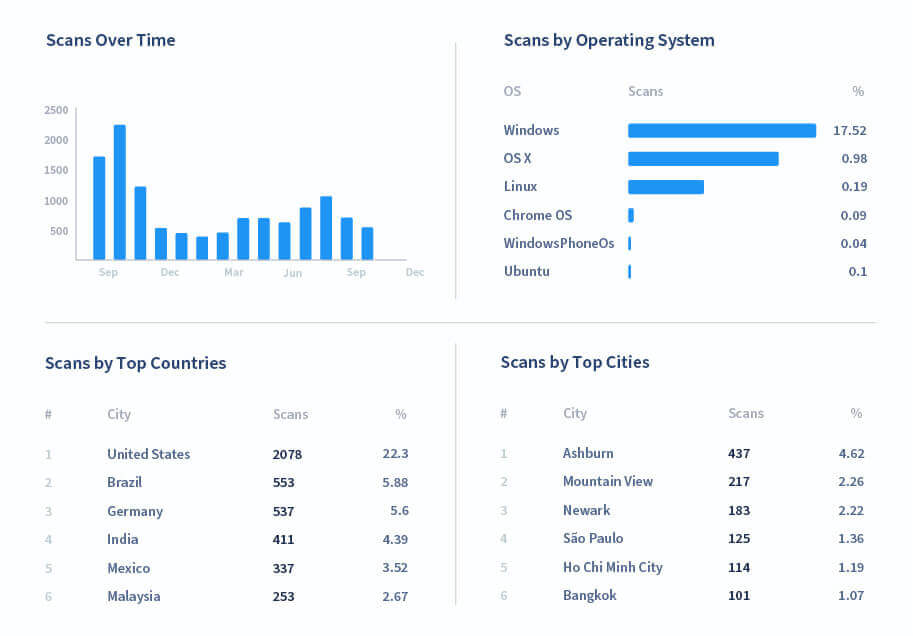
You also gain access to powerful analytics. QR Code Generator PRO tracks:
- Scans over time: See when your campaign peaks.
- Location: Identify which cities or countries scan the most.
- Device type: Know if your audience uses iOS or Android.
- Unique scans: Distinguish between one person scanning five times and five different people scanning once.
This data helps you optimize your marketing campaigns and improve ROI during successive iterations. As you manage your business, active QR Codes will accumulate. It’s important that you use a platform where you can track them effectively.
Best practices to keep in mind before you generate a QR Code
Follow these tips to ensure your codes perform flawlessly:
- Choose a mobile-friendly destination: Users generally scan QR Codes with phones. Make sure your landing page loads fast and looks great on small screens.
- Ensure high contrast: Stick to a dark foreground and a light background. Inverting colors (white code on black background) can sometimes confuse older scanners.
- Mind the quiet zone: Do not crowd the code. Leave enough whitespace around the edges so the scanner can detect the patterns.
- Size matters: Print the code large enough for scanning from a comfortable distance. A code on a billboard needs to be much larger than one on a business card.
- Use a CTA: Tell people what they get for scanning. A frame that says “Scan for Coupon” can drive more action than an unlabeled code.
Unlock the full potential of your QR Codes with QR Code Generator PRO
Creating a QR Code involves sophisticated technology, but your experience should be simple. QR Code Generator PRO combines advanced functionality with an easy-to-use interface.
You gain full control over your QR Code design, ensuring it matches your brand perfectly. You get real-time editing capabilities to keep your content fresh. Most importantly, you get the security and reliability of an enterprise-grade platform. Stop settling for basic black-and-white squares. Transform your customer engagement with smart, trackable, customizable codes.
Ready to start? Sign up for QR Code Generator PRO and launch your first campaign today.




 Add custom colors, logos and frames.
