How To Use QR Codes in Your Digital Ads (With Examples)

QR Code ads have moved from novelty to a standard line item on the media plan. Marketers now treat scannable codes as a core part of digital campaigns. The numbers back the shift: over 90% of marketers used QR Codes in 2025, according to a Bitly marketer survey. Momentum keeps building because marketing and advertising is the fastest-growing QR Code application, according to Mordor Intelligence.
A QR Code in a digital ad does one clear job. It bridges the gap between the screen the viewer sees and the phone in their hand, turning a passive impression into a trackable scan and a real action. This guide covers why QR Codes work, where to place them, real examples, how to measure results, and how to add one.
Key takeaways
- Add QR Codes to your digital ads to bridge screens, moving a viewer from an on-screen impression to a scan and action on their phone.
- Use Dynamic QR Codes to edit the destination after launch and track every scan by unique count, location, time, and device.
- Measure cost per scan and ROI by linking QRCG scan analytics to Google Analytics and following the journey from scan to conversion.
- Customize every code with your brand colors, frame, and logo, so it earns the scan and reinforces trust in the ad.
Why use QR Codes in digital ad campaigns?
Placing a QR Code in a digital ad gives viewers a direct, measurable path from seeing your ad to acting on it. Instead of hoping a viewer remembers your URL, you hand them a one-tap route to your offer. That matters because most ad exposure happens in seconds, and attention fades the moment the ad ends.
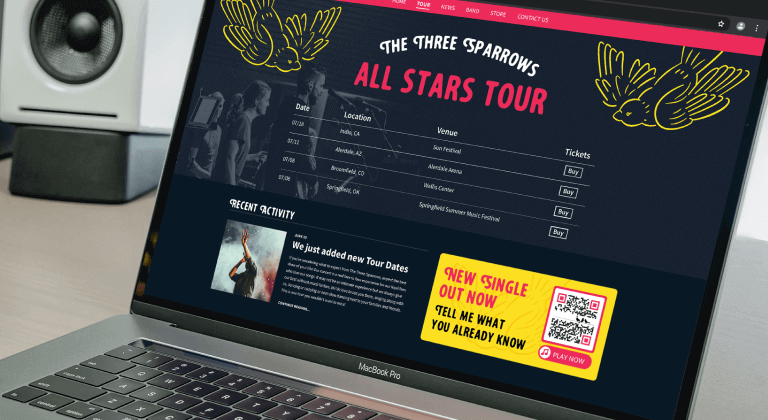
QR Codes also fix a long-standing problem with digital advertising: proving that an ad worked. A scan is a clear signal of intent that you can count, time, and trace. Four benefits make QR Codes a natural fit for digital advertising.
- Cross-device bridging—a viewer sees your ad on desktop, TV, or someone else’s screen and scans to continue on their own phone. That single move closes the gap between an impression on one device and an action on another. It also captures intent in the exact moment the ad earns attention.
- Tracking and attribution—all Dynamic QR Codes collect scan data, including unique versus total scans, location by city and country, time, and device. You can connect campaigns to Google Analytics to follow scans into sessions and conversions. This is the core reason QR Codes belong in performance-driven ads, because you can prove what each placement returns.
- Dynamic editability—with a Dynamic QR Code, you change the destination or landing page after the ad goes live, with no reprint or re-upload. If an offer expires or a link breaks, you fix it in seconds. The printed or published code remains the same while the experience behind it is updated.
- Brand customization—you customize colors, frames, and shapes, then add a logo so the code looks intentional. A branded code signals trust and tells viewers exactly whose experience waits on the other side. A code that looks deliberate earns more scans than a plain black square.
These four benefits explain why QR Codes in digital marketing continue to gain ground. A cross-device bridge, real attribution, editable destinations, and on-brand design solve problems that plain links never could. Together they turn a code into a working part of the campaign, not a decoration.
The market reflects this shift toward measurable, on-brand scanning. The global QR Code market is projected to grow from $13.04 billion in 2025 to $33.14 billion by 2031, according to Mordor Intelligence. QRCG supports this with a full QR Code marketing platform that pairs design, dynamic editing, and scan analytics in one place. Choose Static QR Codes for permanent, non-editable links, or Dynamic QR Codes when you need editable destinations and scan tracking.
The choice matters most in advertising, where campaigns change and you must prove results. A Static QR Code is free and never expires, but it cannot report any scan data or update its destination. A Dynamic QR Code, available on paid plans, tracks every scan and lets you edit the link after launch. For any ad you plan to measure or optimize, a Dynamic QR Code is the practical choice.
Where QR Codes work in digital advertising
QR Codes in advertising fit almost any digital channel where a viewer holds a phone or sits near one. The table below shows where a code adds value and what to say next to it.
| Ad channel | Why a QR Code helps | Example CTA |
|---|---|---|
| Display / PPC banner ads | Turns a static banner into a scannable action | Scan to shop the sale |
| Paid social (Meta, TikTok, Pinterest) | Moves scroll-stoppers straight to your offer | Scan to unlock the deal |
| Email marketing | Bridges desktop email to a mobile action | Scan to book on your phone |
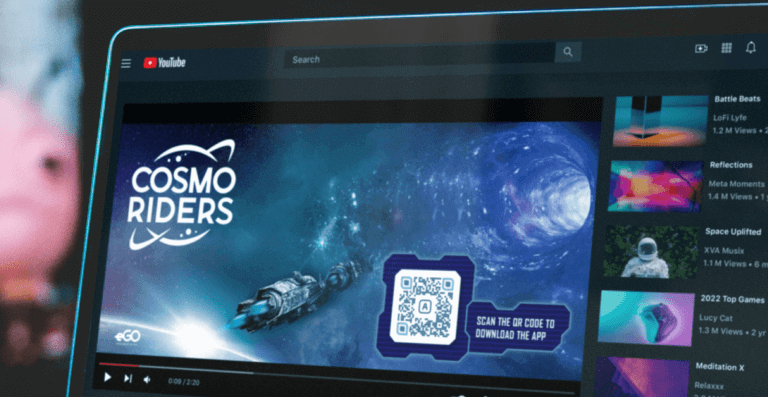
| Video and YouTube ads | Captures intent while the viewer watches | Scan to start your trial |
| Connected TV (CTV) | Links the big screen to a personal device | Scan to claim your coupon |
| In-app / app-install ads | Sends engaged users to the next step | Scan to get started |
Each channel plays to a different strength. Display and paid social reach people who already hold a phone, so the scan happens in the same breath as the impression. Email and video build interest first, then a code gives that interest a place to go.
YouTube QR Code ads are a strong fit here, because viewers often watch on a TV or a second screen with a phone nearby. In-app and app-install ads meet users who are primed to take the next step.
Connected TV is the fastest-rising place for brands to add scannable ads, because viewers watch with a phone within reach. A CTV code must stay on screen long enough for someone to notice it, pick up their phone, and scan it. Point that code to a mobile-friendly destination so the experience feels seamless after the scan. Pair every placement with a clear call to action that tells viewers exactly what they get.
Real QR Code ad campaign examples
The strongest QR Code advertising examples pair a single clear incentive with a code that is easy to catch and scan. These verified QR Code ad examples show what that looks like in practice. Each one offers a takeaway you can apply to your own creative QR Code ads.
- Coinbase (2022 Super Bowl): A 60-second spot showed a single color-changing QR Code bouncing around a black screen like a DVD screensaver, with no voiceover. Coinbase’s post-game statement reported the ad drove over 20 million landing-page hits in one minute, roughly six times its previous benchmarks. The surge forced Coinbase to briefly throttle traffic. Takeaway: a single strong incentive plus a scannable code can carry an entire ad on its own.
- Burger King (2020): Three TV spots showed a QR Code floating around the screen. Viewers who caught and scanned it received a coupon for a free Whopper redeemed through the BK App, capped at 10,000. The code also let the brand track which spots drove the most scans. Takeaway: interactivity plus attribution boosts scan intent and sharpens where you spend media dollars.
- Avocados From Mexico (2022 Super Bowl): Ran a shoppable “scan to buy” QR Code in its broadcast spot, letting viewers order from the couch. The approach generated first-party data and a lift in connected TV conversion, according to AdAge reporting. Takeaway: a shoppable code shortens the path from ad to purchase and turns a brand moment into a sale.
These ads with QR Codes share a pattern: an easy target, a clear reward, and a reason to scan right now. Each brand also gave the code room to breathe, so the scan never competed with a crowded frame. And each one tied the scan to a measurable result, whether that was traffic, coupon redemptions, or first-party data.
You can study more QR Code marketing examples to see how brands apply the same principles across channels. The lesson holds across budgets: you do not need a Super Bowl slot to make a code work. Start with one incentive strong enough to interrupt the scroll or hold the remote.
QR Codes, AR, and interactive ad experiences
A QR Code can trigger augmented reality and interactive experiences straight from an ad, with no app download required. A viewer scans the code, and their phone browser loads a 3D product, a virtual try-on, or an immersive demo. This turns a flat impression into something the audience can touch, spin, and explore.
QR Codes and augmented reality marketing work well because they remove the biggest barrier: friction. Consider product packaging or a print-to-digital ad. A shopper scans a code on the box and sees the product come to life in augmented reality on their screen. The experience feels premium, and it holds attention far longer than a static image.
Start with a lightweight experience that loads fast on any phone, then build from there. Add a clear “Scan to view in AR” instruction next to the code so viewers know the payoff before they scan. A short, obvious prompt lifts scan rates and sets the right expectation for what happens next.
Because you can drive the AR experience with a Dynamic QR Code, you can refresh the demo without changing the ad. Swap a seasonal model, fix a broken asset, or point to a new campaign, all behind the same code. That flexibility keeps an interactive ad useful long after it first runs.
How to measure ROI and cost per scan
You measure QR Code ad performance by tracking scans, tying each scan to an outcome, and weighing that outcome against spend. This gives you cost per scan and ROI for every placement. Both numbers let you compare a QR Code campaign against your other channels on equal terms. The bullets below break down the metrics that matter and how to capture them.
- Cost per scan: Divide total ad spend by the number of scans it drove, then compare that figure across placements to identify the most efficient ad. A low cost per scan tells you which creative and channel earn action for the least money.
- Conversion and ROI: Tie each scan to a downstream outcome, such as a sign-up, purchase, or lead, then weigh that value against spend. This turns scan volume into a revenue story your team can act on.
- Key metrics to watch: Track unique versus total scans, scan location, time, and device, plus your conversion rate after the scan. Together, these show not just how many people scanned, but who acted and where.
- How to track it: Use a Dynamic QR Code and connect scans to Google Analytics to follow the full journey from scan to conversion. Static QR Codes cannot report scans, so Dynamic QR Codes are the right choice for measurable ads.
The hard part is not counting scans; it is seeing what happens after them. In fact, understanding the post-scan customer journey is the top ROI challenge for 87% of marketers, according to Bitly.
Dynamic QR Codes paired with a Google Analytics integration close that gap. They connect each scan to the sessions and conversions in the tools you already use. That link is what lets you attribute revenue to a specific ad rather than guessing.
Run the math per placement, not just per campaign. A display banner and a CTV spot can have very different costs per scan, and only a side-by-side view reveals the difference. Shift budget toward the placements that earn the cheapest, highest-converting scans, then keep testing new creative against your best performer.
Pay attention to unique scans, not just total scans, when you judge reach. Total scans count every scan, while unique scans count individual devices, so the two numbers tell different stories. A high total with few unique scans often means the same fans were scanned twice, not that new people were scanned. Reading both figures keeps your cost per scan honest and your reach claims accurate.
How to add QR Codes to your digital ads (step by step)
You can add a trackable QR Code to a digital ad in 5 steps, from creation to ongoing optimization. The workflow below keeps design, destination, and measurement aligned so the code performs from launch day. None of it requires design or development skills, which suits lean teams. Follow each step in order before you push the ad live.
- Create your QR Code in QR Code Generator. Choose a Dynamic QR Code when you want to track scans and edit the destination later.
- Design it on-brand with your colors, a frame, a logo, and a clear CTA. A branded code earns more scans than a plain one because viewers trust what they recognize.
- Link it to a mobile-optimized destination or landing page. Every scan happens on a phone, so the page must load quickly and be easy to read on a small screen.
- Size and place it correctly, then test on multiple devices before launch. Confirm the code scans cleanly from a real viewing distance, not just up close.
- Track scans and edit the destination as the campaign evolves. Update the link when an offer changes, so the same code always points to something useful.
Match the destination to the promise in your ad. If the ad offers a discount, the scan should open the discount, not your homepage. A mismatch between the ad and the landing page is the fastest way to lose a hard-won scan. Because a Dynamic QR Code stays editable, you can fix a weak destination the moment your scan data shows people leaving.
Give each campaign its own code so you can distinguish placements in your reports. One code per placement lets you compare a banner against a video ad without guessing which drove the scan. This small habit turns your scan data into clear, side-by-side answers about what works.
Keep these design best practices in mind before you publish:
- Use a minimum size of around 2 x 2 cm, roughly 1 inch, for print and small placements.
- Apply the 10:1 distance-to-size rule for large placements like CTV and billboards. A code seen from 3 meters needs to be at least 30 cm wide.
- Keep high contrast between the code and its background so scanners read it fast.
- Always test on several phones and cameras before launch.
Testing is the step teams skip most, and it costs them scans. A QR Code that looks sharp on a laptop can fail on a dim TV or a small mobile screen. Scan it yourself from the distance a real viewer would, on more than one phone, before the ad goes anywhere.
For a deeper walkthrough of formats, placements, and creative tactics, read the full QR Code advertising guide. It expands on everything covered here with more examples and channel-specific tips. If you are still mapping out the basics, our guide on using QR Codes for business covers the fundamentals across everyday use cases.
Turn every scan into a measurable campaign win
QR Codes turn your digital ads into two-way moments, connecting a single impression to a trackable, on-brand action your audience can take in seconds. The right code can ensure your marketing materials serve as an ideal digital bridge to your brand’s online sales environment.
Sign up for QR Code Generator and start adding trackable QR Codes to your ad campaigns today.
Frequently asked questions
Do QR Codes work in digital ads?
Yes. QR Codes give viewers a fast, direct way to act on display, paid social, video, connected TV, and email ads. Adoption backs this up: Over 90% of marketers used QR Codes in 2025, according to Bitly. Marketing and advertising is also the fastest-growing use, expanding at an 18.16% CAGR per Mordor Intelligence.
How do you track QR Codes in a digital ad campaign?
Use a Dynamic QR Code, which records every scan. QRCG scan analytics show unique versus total scans, plus the location, time, and device for each. Connect the code to your Google Analytics account to tie scans to sessions, campaigns, and conversions in the tools you already use.
What is the cost per scan for a QR Code campaign?
Calculate cost per scan by dividing total ad spend by the number of scans the campaign drives. Track scans with a Dynamic QR Code, then compare that figure across placements to see which ads earn action most efficiently. Improve the number over time by editing the destination, refreshing the creative, and testing new placements, all without reprinting the code.
How do you measure the ROI of a QR Code ad campaign?
Tie each scan to a downstream outcome, such as a sign-up, purchase, or lead, then weigh that value against your ad spend. This depends on visibility into what happens after the scan, which remains the hard part: Understanding the post-scan customer journey is the top challenge for 87% of marketers, Bitly reports. Close that gap by routing scans through QRCG analytics and Google Analytics so you can attribute revenue to specific ads.
Can you use QR Codes in connected TV or YouTube ads?
Yes. An on-screen QR Code lets viewers scan with their phone while they watch, so you capture intent on a device built for action. Keep the code on screen long enough to scan it, size it for the display, and link it to a mobile-friendly destination. Because a Dynamic QR Code stays editable, you can update where it leads without re-cutting the video.




QR Code Generator
Your all-in-one QR Code marketing platform
Now you can fully customize your QR Codes with your brand colors and company logo, get scan statistics, and even edit the content after print.